Welcome to Jiangshan Xinyuan Electrical Co., Ltd.!
Hotline:0570-4010338




Anti-misoperation Mechanical Program Lock
Category :
Keyword :
Anti-misoperation Mechanical Program Lock
hiddenValue
Product Introduction
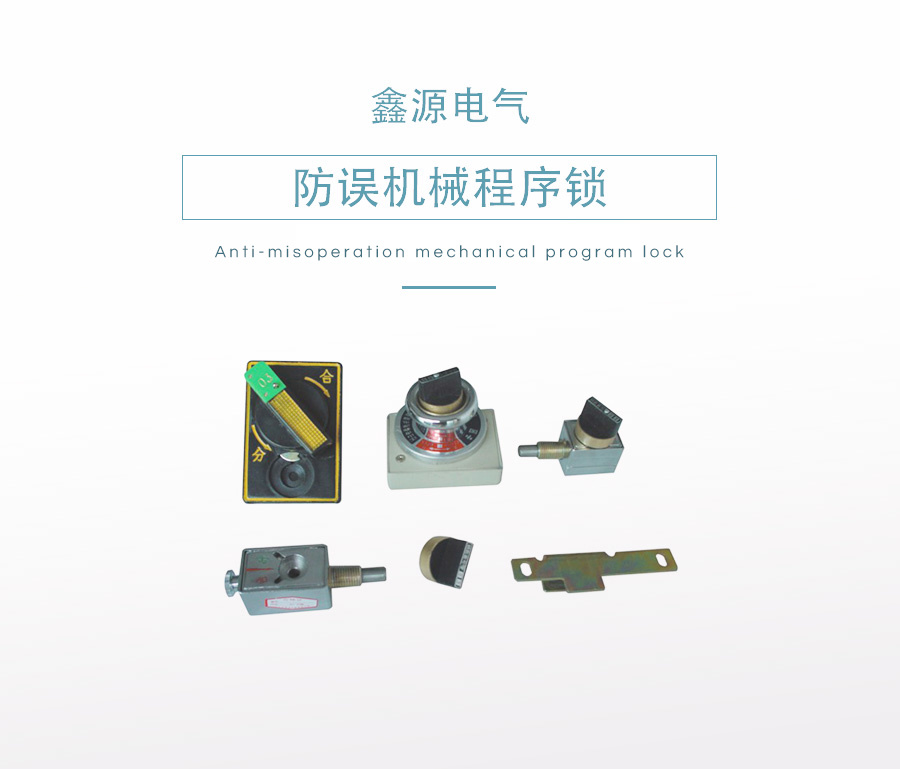
| Simple Operation Instructions
1. Control Switch Lock The control switch lock replaces the original control switch panel and handle. Insert the program key into the hole at the bottom of the lock panel, then insert the red tag and turn the handle clockwise to close the circuit. To open the circuit, replace with the green tag and turn the handle counterclockwise. The program key cannot be removed when in the pre-open position. Note: When the control switch lock is not paired with the transfer switch, do not rotate 360° to avoid damage; only try turning between the closed and open positions. 2. Knife Switch Lock When opening the circuit, insert the key into the slot marked with the "Close" character, turn the key clockwise to align the marks on the key and the lock body, pull out the locking pin, operate the knife switch handle. After opening, the locking pin automatically resets, continue turning the key clockwise to the slot marked "Open" and remove the key to lock it. When closing the circuit, insert the key into the slot marked with the "Open" character, turn the key counterclockwise to align the marks on the key and the lock body, pull out the locking pin, operate the knife switch handle. After closing, the locking pin automatically resets, continue turning the key counterclockwise to the slot marked "Close" and remove the key to lock it. Note: Generally, it is not allowed to operate the lock with both hands simultaneously (i.e., one hand operating the key, the other pulling the locking pin). The direct-operated knife switch lock has single-slot and double-slot types. During operation, the locking pin extends and retracts with the rotation of the key. It is mainly used for XGN cabinets and ring network cabinets. 3. Cabinet (Network) Door Lock: When opening the door, insert the key into the lock hole of the network door lock, turn the key clockwise to the position, remove the key and open the network door. When closing the door, insert the key into the lock hole of the network door lock, close the door properly, turn the key counterclockwise to the position, remove the key to lock it. Note: Except for the control switch lock, each set of locks on other lock bodies has its operation sequence number. That is, stamped with 1, 2, 3, 4 (opening sequence) in order. Open in sequence or close in the order 4, 3, 2, 1 accordingly. |
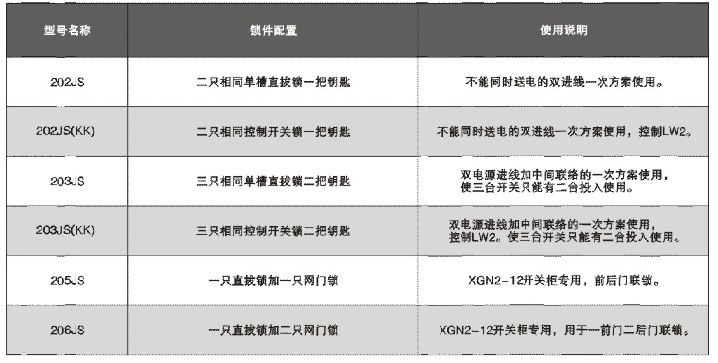
| Description of Common Model Mechanical Program Locks |
Related Products
Consult Now
Hello, what do you need us to do for you?



Contact Us
Phone:0570-4010338 / 0570-4058008
Address: No. 2 Huiyuan Road, Shanhai Cooperation Zone, Jiangshan Economic Development Zone, Zhejiang Province
Email:xydq@xinyuan-electrical.com
Fax: 0570-4018638/0570-4911443
COPYRIGHT © Jiangshan Xinyuan Electrical Co., Ltd. | powered by www.300.cn

浙公网安备 33088102002525号